What is UI/UX Design and Why Does Your Business Need It in 2026?
Every digital interaction your customers have with your business is shaped by design. From the moment they land on your website to the final click completing a purchase, design decisions determine whether they stay, engage, convert—or abandon you forever.
But what is UI/UX design exactly? These terms are constantly mentioned yet frequently misunderstood. Many business owners confuse them, use them interchangeably, or dismiss them as mere aesthetic concerns. This confusion costs millions in lost revenue annually.
In 2026, with 5.4 billion digital users worldwide, understanding what is UI/UX design and investing strategically in it separates thriving businesses from struggling ones. Companies prioritizing UX design report 32% higher revenue growth. Every dollar invested in UX returns $100 in benefits. Poor UX drives 70% of online business failures.
This comprehensive guide demystifies what is UI/UX design, explains their distinct roles, reveals their business impact, and provides actionable strategies for implementation. Whether you’re building a new product, redesigning your website, or simply seeking competitive advantage, this knowledge is essential.
What is UI/UX Design? Understanding the Fundamentals
Before exploring business applications, let’s clearly define what is UI/UX design and distinguish these interconnected disciplines.
What is UI Design? (User Interface Design)
UI (User Interface) Design focuses on the visual and interactive elements users directly touch, see, and manipulate. It’s the aesthetic layer—the buttons, colors, typography, icons, spacing, and responsive layouts that create immediate visual impressions.
UI Design Components:Table
| Element | Purpose | Example |
|---|---|---|
| Visual Design | Brand identity, emotional connection | Color schemes, imagery, logos |
| Typography | Readability, hierarchy, personality | Font selection, sizing, spacing |
| Layout & Spacing | Content organization, visual flow | Grid systems, white space, alignment |
| Interactive Elements | User actions, feedback | Buttons, forms, sliders, toggles |
| Responsive Design | Cross-device consistency | Mobile, tablet, desktop adaptations |
| Microinteractions | Delight, confirmation, engagement | Animations, hover states, loading indicators |
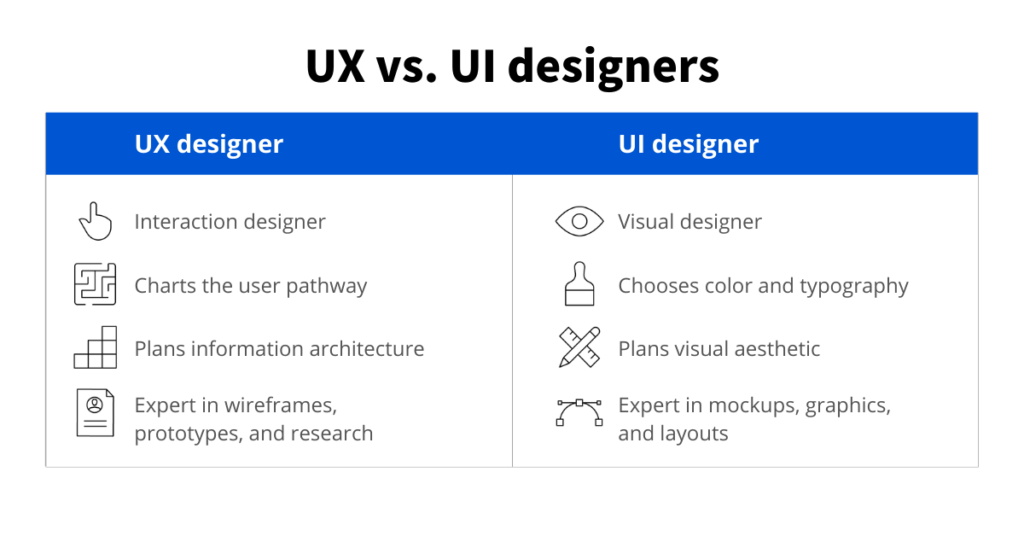
UI Designer Responsibilities:
- Create visually appealing, brand-aligned interfaces
- Design consistent component libraries and design systems
- Ensure responsive layouts across all screen sizes
- Establish visual hierarchy guiding user attention
- Collaborate with developers on implementation fidelity
What is UX Design? (User Experience Design)
UX (User Experience) Design encompasses the entire journey users take when interacting with your product or service. It’s the strategic layer—research, information architecture, user flows, usability, and emotional satisfaction throughout the experience.
UX Design Components:Table
| Element | Purpose | Example |
|---|---|---|
| User Research | Understanding needs, behaviors, pain points | Interviews, surveys, analytics analysis |
| Information Architecture | Content organization, findability | Site maps, navigation structures, categorization |
| User Flows | Task completion paths | Journey maps, flowcharts, decision trees |
| Wireframing & Prototyping | Structure testing before visual design | Low-fidelity sketches, interactive prototypes |
| Usability Testing | Validation, problem identification | A/B testing, heatmaps, session recordings |
| Accessibility | Inclusive design for all users | Screen reader compatibility, keyboard navigation, color contrast |
UX Designer Responsibilities:
- Conduct research understanding user needs and business goals
- Create user personas representing target audiences
- Design intuitive navigation and information structures
- Build wireframes and prototypes for testing
- Validate designs through usability testing
- Iterate based on feedback and data
What is UI/UX Design? The Critical Relationship
What is UI/UX design together? They’re inseparable partners creating complete digital experiences:Table
| UI Without UX | UX Without UI | UI/UX Together |
|---|---|---|
| Beautiful but confusing | Functional but ugly | Beautiful AND functional |
| Users admire then abandon | Users tolerate but don’t enjoy | Users love and return |
| High bounce rates | Low brand perception | High conversion and loyalty |
| Wasted development investment | Missed emotional connection | Maximum business impact |
Analogy: UI is the car’s exterior paint, interior materials, dashboard layout, and button placement. UX is the driving experience—how it handles, whether controls are intuitive, if the journey feels enjoyable. A beautiful car that’s frustrating to drive fails. A reliable car that’s unpleasant to own disappoints. Success requires both.
What is UI/UX Design’s Business Impact? Proven ROI
Understanding what is UI/UX design matters because it directly drives measurable business outcomes.
The Financial Case for UI/UX Investment
Table
| Statistic | Source | Business Implication |
|---|---|---|
| $100 return per $1 invested in UX | Forrester Research | 9,900% ROI on UX design |
| 32% revenue growth | McKinsey Design Index | Design-led companies outperform |
| 50% development time reduction | IEEE | UX research prevents costly rework |
| 400% conversion increase | Forrester | Proper UX design transforms results |
| 88% online consumers less likely to return after bad experience | Gomez Report | Poor UX destroys customer lifetime value |
| 70% of online businesses fail due to bad usability | UIE | UX is survival-critical |
Specific Business Benefits
Increased Conversions:
- Simplified checkout processes reduce cart abandonment 35%
- Clear calls-to-action improve click-through rates 200%
- Trust signals and social proof increase form completions 50%
Reduced Costs:
- Early UX testing prevents expensive post-launch fixes
- Clear user flows reduce customer service inquiries 30%
- Intuitive design decreases training needs for internal tools
Customer Loyalty:
- Positive experiences create emotional brand connections
- Easy-to-use products generate word-of-mouth referrals
- Reduced friction increases repeat purchase rates
Competitive Advantage:
- Superior UX differentiates commoditized products
- Design patents protect innovations
- First-mover advantage in experience innovation
Real-World Success Stories
Airbnb: Complete UX redesign focusing on professional photography and trust signals increased bookings 30% and company valuation to $75 billion.
Bank of America: UX improvements to online banking registration increased completion rates 45%, generating millions in new account revenue.
IBM: Investment in design thinking and UX training returned $20 for every $1 spent through faster development and better products.
What is UI/UX Design in Practice? The Complete Process
Understanding what is UI/UX design requires seeing how professionals execute it.
Phase 1: Research & Discovery
User Research:
- Stakeholder interviews understanding business goals
- User interviews revealing needs, pain points, desires
- Competitive analysis identifying market gaps
- Analytics review of current performance
- Survey distribution for quantitative insights
Deliverables:
- User personas (fictional but research-based user profiles)
- User journey maps (current state visualization)
- Problem statements (clearly defined challenges to solve)
- Project brief (aligned objectives and success metrics)
Phase 2: Strategy & Information Architecture
UX Strategy:
- Feature prioritization based on user value and business goals
- Content strategy and requirements
- Technical constraints and opportunities
- Success metrics definition (KPIs, analytics setup)
Information Architecture:
- Site mapping (page hierarchy and relationships)
- Navigation design (menus, breadcrumbs, search)
- User flow mapping (optimal paths to conversion)
- Content categorization and labeling
Deliverables:
- Site maps
- User flow diagrams
- Content inventory
- Wireframe sketches
Phase 3: Design & Prototyping
Wireframing:
- Low-fidelity layouts showing structure without visual polish
- Rapid iteration based on feedback
- Focus on functionality and content hierarchy
UI Design:
- Visual design system creation (colors, typography, components)
- High-fidelity mockups of key screens
- Responsive design adaptations
- Interactive prototype building
Deliverables:
- Wireframes (low and high fidelity)
- Interactive prototypes (clickable simulations)
- Design system documentation
- UI component library
Phase 4: Testing & Validation
Usability Testing:
- Moderated sessions (guided observation)
- Unmoderated remote testing (task-based feedback)
- A/B testing (variant performance comparison)
- Heatmap and session recording analysis
Iteration:
- Issue prioritization based on severity and frequency
- Design refinements addressing problems
- Re-testing validation of solutions
- Stakeholder approval of final designs
Deliverables:
- Usability test reports
- Issue prioritization matrices
- Refined designs
- Development-ready specifications
Phase 5: Development & Launch
Design Handoff:
- Detailed specifications for developers
- Asset preparation (icons, images, animations)
- Style guides and component documentation
- Quality assurance criteria
Post-Launch:
- Analytics monitoring against KPIs
- User feedback collection
- Continuous improvement iteration
- Design system maintenance
What is UI/UX Design’s Role in Different Industries?
What is UI/UX design varies by industry context. Here’s how it applies across sectors:
E-Commerce UI/UX
Critical Elements:
- Product discovery (search, filtering, recommendations)
- Trust building (reviews, security signals, return policies)
- Frictionless checkout (minimal steps, guest checkout, multiple payment options)
- Mobile optimization (thumb-friendly navigation, simplified flows)
Business Impact: Amazon’s patented one-click ordering (UX innovation) generated billions in additional revenue by reducing purchase friction.
Healthcare UI/UX
Critical Elements:
- Accessibility (WCAG compliance, screen readers, cognitive load reduction)
- Trust and calm (anxiety-reducing visual design, clear information hierarchy)
- Emergency efficiency (rapid access to critical functions)
- Privacy assurance (HIPAA-compliant interfaces, clear data handling)
Business Impact: Improved patient portal UX increases appointment scheduling 40%, reducing no-shows and administrative costs.
Financial Services UI/UX
Critical Elements:
- Security perception (without adding friction)
- Complex data visualization (portfolio performance, market trends)
- Trust signals (regulatory compliance, transparency)
- Task efficiency (quick transfers, bill payments, account management)
Business Impact: Intuitive mobile banking apps reduce branch visits 60%, cutting operational costs while improving satisfaction.
SaaS/B2B UI/UX
Critical Elements:
- Onboarding flows (time-to-value reduction)
- Feature discoverability (complex functionality without overwhelm)
- Collaboration tools (multi-user workflows, permissions)
- Integration clarity (API connections, data synchronization)
Business Impact: Slack’s playful, intuitive UX differentiated it in crowded team communication markets, driving $27 billion valuation.
What is UI/UX Design Implementation? DIY vs. Agency
Understanding what is UI/UX design leads to implementation decisions.
DIY UI/UX Design
Tools:
- Figma: Collaborative interface design (free tier available)
- Adobe XD: Adobe ecosystem integration
- Sketch: Mac-native design tool
- Miro: Collaborative whiteboarding for research and mapping
- Hotjar: Heatmaps and session recordings for testing
Best For:
- Early-stage startups with limited budgets
- Simple products with straightforward user flows
- Technical founders with design sensibility
- Rapid prototyping and validation
Limitations:
- Lack of specialized research expertise
- Biased perspective (you’re not your user)
- Time investment detracting from core business
- Limited access to diverse user testing participants
Professional UI/UX Agencies
Services:
- Comprehensive research and strategy
- End-to-end design process execution
- Specialized expertise (accessibility, mobile-first, specific industries)
- Objective user testing with diverse participants
- Design system creation for scaling
Best For:
- Complex products requiring sophisticated solutions
- Established businesses seeking competitive differentiation
- Teams lacking internal design expertise
- High-stakes projects where failure is costly
Investment:
- Small projects: $5,000-$15,000
- Medium projects: $15,000-$50,000
- Enterprise projects: $50,000-$200,000+
The Hybrid Approach
Many successful businesses combine both:
- Agencies for: Initial strategy, complex problems, design system creation
- Internal teams for: Day-to-day execution, incremental improvements, maintenance
What is UI/UX Design’s Future? Emerging Trends (2026)
What is UI/UX design continuously evolves. Current trends shaping the field:
AI-Powered Personalization
Machine learning enables interfaces that adapt to individual users in real-time—predicting needs, customizing layouts, and automating routine tasks. Netflix’s recommendation engine (UX innovation) drives 80% of watched content.
Voice and Conversational UI
Voice assistants, chatbots, and natural language interfaces reduce visual interface dependency. Designing for voice requires new approaches to information architecture and user feedback.
Augmented Reality (AR) Integration
AR overlays digital information on physical environments, transforming retail (virtual try-on), navigation (directional overlays), and education (interactive models).
Ethical and Inclusive Design
Designers increasingly prioritize:
- Dark patterns elimination (manipulative interfaces)
- Algorithmic transparency (explaining AI decisions)
- Universal accessibility (designing for permanent, temporary, and situational disabilities)
- Digital wellbeing (reducing addictive design elements)
Sustainable Design
Reducing computational load through efficient design decreases carbon footprints—particularly relevant as digital consumption grows.
Conclusion: UI/UX Design is Business Strategy
Now you fully understand what is UI/UX design and its transformative business impact. It’s not decoration or afterthought—it’s fundamental strategy determining whether customers choose you, stay with you, and recommend you.
In 2026’s saturated digital markets, products with equivalent features compete primarily through experience. Superior UI/UX design is your most sustainable competitive advantage because it’s difficult to copy and deeply connects with users.
Invest accordingly. Your business success depends on it.
Elevate Your Business with Spiderhunts UI/UX Design
Ready to transform understanding what is UI/UX design into business results? Spiderhunts Technologies creates exceptional user experiences that drive growth.
Schedule Your Free UX Consultation
Our UI/UX Design Services
- UX Research & Strategy: User interviews, competitive analysis, journey mapping
- UI Design Systems: Visual languages ensuring consistency and scalability
- Web & App Design: Responsive interfaces optimized for conversion
- Usability Testing: Validation with real users, iterative refinement
- Design Audits: Expert review of existing products with improvement roadmaps
- Design Systems: Component libraries accelerating future development
Why Spiderhunts for UI/UX
- 250+ successful design projects
- Research-driven process (no guesswork)
- Conversion-focused design (beauty that performs)
- Accessibility expertise (inclusive by default)
- Pakistani pricing advantage (40-60% cost savings)
- Seamless developer handoff (designs built as envisioned)
Design Success Stories
“Spiderhunts redesigned our e-commerce experience. Conversion increased 85%, and customer complaints dropped 70%.” — Fatima Ali, CEO, Moda Pakistan
“Their UX research revealed problems we never knew existed. The redesigned app has 4.8-star ratings and 40% higher retention.” — David Chen, Product Director, TaskFlow Inc.
🌐 Website:www.spiderhunts.com
Stop wondering what is UI/UX design. Let Spiderhunts show you what it achieves for your business.