
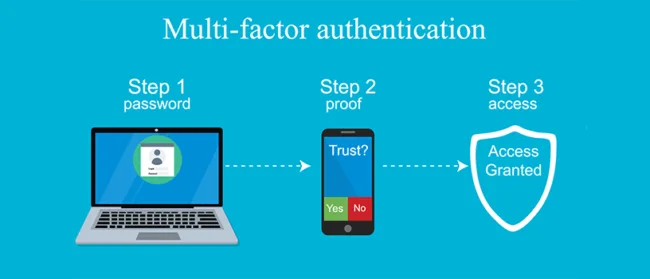
Introduction to Multi-Factor Authentication Implementation
In an era where password breaches compromise millions of accounts annually, multi-factor authentication implementation has become essential for protecting organizational and personal digital assets. Recent data from Microsoft Security reveals that MFA blocks over 99.9% of automated cyberattacks, making it one of the most effective security controls available.
Despite these compelling statistics, many organizations struggle with multi-factor authentication implementation, facing challenges around user adoption, technical complexity, and balancing security with usability. According to Verizon’s 2025 Data Breach Investigations Report, stolen credentials remain the primary attack vector in data breaches, yet MFA adoption rates lag behind the urgency of the threat.
This comprehensive guide provides actionable strategies for successful multi-factor authentication implementation across your organization. Whether you’re securing cloud applications, on-premises systems, remote access, or customer-facing services, you’ll learn practical approaches to deploy MFA effectively while maintaining user experience and operational efficiency.
Understanding Multi-Factor Authentication Fundamentals
What is Multi-Factor Authentication?
Multi-factor authentication implementation requires users to provide two or more verification factors to gain access to a resource. These factors fall into three primary categories:
Something You Know (Knowledge Factor):
- Passwords or PINs
- Security questions
- Pattern locks
Something You Have (Possession Factor):
- Hardware security keys (FIDO2 tokens)
- Mobile devices with authenticator apps
- Smart cards
- SMS or email codes
Something You Are (Inherence Factor):
- Fingerprint scans
- Facial recognition
- Iris scans
- Voice recognition
Effective multi-factor authentication implementation combines factors from at least two different categories. Using two factors from the same category (like password and security question) does not constitute true MFA and provides minimal additional security.
Learn authentication fundamentals from NIST Digital Identity Guidelines
Why Multi-Factor Authentication Implementation Matters
Traditional password-only authentication faces multiple vulnerabilities:
- Credential Stuffing: Attackers use leaked credentials from one breach to access other accounts
- Phishing Attacks: Social engineering tricks users into revealing passwords
- Brute Force: Automated tools systematically guess passwords
- Keylogging Malware: Software records keystrokes to capture credentials
- Password Reuse: Users employ identical passwords across multiple services
According to Google’s security research, on-device prompts used in MFA reduce account compromise risk by 100% for automated bots, 96% for bulk phishing attacks, and 76% for targeted attacks. These statistics demonstrate why multi-factor authentication implementation has become a security imperative.
Multi-Factor Authentication Methods: Choosing Your Implementation Approach
SMS and Email-Based MFA Implementation
How It Works: Systems send one-time codes via SMS messages or email that users enter along with their password.
Advantages:
- Low implementation complexity
- No additional hardware requirements
- Works with existing mobile phones
- High user familiarity
Disadvantages:
- Vulnerable to SIM swapping attacks
- SMS interception possible
- Email account compromise risk
- Delivery delays can frustrate users
- Not recommended for high-security environments
Best For: Low-risk applications, consumer services, initial MFA rollout phases
Implementation Considerations: While SMS-based MFA provides better protection than passwords alone, NIST recommends moving toward more secure methods for sensitive applications due to known vulnerabilities.
[Image Alt Text Suggestion]: “SMS-based multi-factor authentication implementation flow”
Authenticator App-Based MFA Implementation
How It Works: Time-based One-Time Password (TOTP) apps like Google Authenticator, Microsoft Authenticator, or Authy generate rotating codes that sync with authentication servers.
Advantages:
- More secure than SMS
- Works offline
- No carrier dependency
- Free to implement
- Industry-standard protocol (RFC 6238)
Disadvantages:
- Requires app installation
- Device loss complicates recovery
- Manual setup can confuse users
- No cloud backup in some apps
Best For: Enterprise applications, employee accounts, medium-security requirements
Implementation Best Practices:
- Provide clear setup instructions with screenshots
- Offer multiple authenticator app options
- Implement backup codes for device loss scenarios
- Consider apps with cloud backup features for improved recovery
Download authenticator apps: Google Authenticator, Microsoft Authenticator, Authy
Push Notification-Based MFA Implementation
How It Works: Systems send push notifications to registered mobile devices. Users approve or deny login attempts with a single tap.
Advantages:
- Excellent user experience
- Fast authentication
- Displays login context (location, device)
- Phishing resistant when properly implemented
- No code entry required
Disadvantages:
- Requires internet connectivity
- Push fatigue vulnerability
- App installation required
- Notification delivery dependencies
Best For: Organizations prioritizing user experience, remote workforce authentication, frequent access scenarios
Security Enhancements:
- Implement number matching (user enters displayed number on device)
- Show login context (time, location, device)
- Limit push notification frequency to prevent fatigue attacks
- Require biometric confirmation for high-risk transactions
[Internal Link Opportunity]: Link to your article on “Mobile Device Security” or “Remote Access Security”
Hardware Security Keys (FIDO2/WebAuthn) Implementation
How It Works: Physical USB, NFC, or Bluetooth devices provide cryptographic proof of identity. Keys use public-key cryptography to authenticate without transmitting secrets.
Advantages:
- Phishing-resistant authentication
- Strongest security available
- No SMS or app vulnerabilities
- Works across devices and platforms
- Eliminates shared secret risks
Disadvantages:
- Hardware purchase costs
- Physical key loss requires replacement
- User training needed
- Limited support in legacy systems
Best For: High-security environments, privileged accounts, compliance requirements (finance, healthcare, government)
Implementation Strategy:
- Deploy to high-value targets first (executives, IT admins)
- Provide backup authentication methods
- Issue multiple keys per user
- Implement key registration workflows
- Choose keys supporting multiple protocols (USB-A, USB-C, NFC)
Popular hardware keys include YubiKey, Titan Security Key, and Thetis.
Learn FIDO2 standards from FIDO Alliance
Biometric Authentication Implementation
How It Works: Systems verify identity through unique biological characteristics like fingerprints, facial features, iris patterns, or voice.
Advantages:
- Seamless user experience
- Cannot be forgotten or lost
- Difficult to replicate
- Fast authentication
- Increasing device availability
Disadvantages:
- Privacy concerns
- Biometric data breach consequences permanent
- False acceptance/rejection rates
- Spoofing vulnerabilities in low-quality implementations
- Accessibility challenges for some users
Best For: Mobile applications, consumer services, device unlock, combined with other factors
Security Requirements:
- Use liveness detection to prevent photo/video spoofing
- Store biometric data locally on devices, not centrally
- Implement biometric templates rather than raw data
- Require fallback authentication methods
- Comply with biometric privacy regulations (GDPR, BIPA)
Review biometric standards from IEEE Biometrics Council
Certificate-Based Authentication Implementation
How It Works: Digital certificates installed on devices provide cryptographic identity verification.
Advantages:
- Strong cryptographic security
- Enables device trust
- Integrates with PKI infrastructure
- Supports automated authentication
- Granular access control possible
Disadvantages:
- Complex initial setup
- Certificate lifecycle management required
- Revocation challenges
- User experience complexity
- Infrastructure dependencies
Best For: Enterprise environments, device-based access control, API authentication, zero trust architectures
Implementation Considerations:
- Establish Public Key Infrastructure (PKI)
- Automate certificate enrollment
- Implement certificate lifecycle management
- Plan certificate revocation procedures
- Monitor certificate expiration
Planning Your Multi-Factor Authentication Implementation
Assessing Organizational Requirements
Successful multi-factor authentication implementation begins with thorough assessment:
Risk Analysis:
- Identify high-value assets and sensitive data
- Determine threat landscape for your industry
- Evaluate regulatory compliance requirements
- Assess current authentication vulnerabilities
User Population Analysis:
- Employee types (office-based, remote, field workers)
- Customer or partner access requirements
- Technical sophistication levels
- Device availability and diversity
Application Inventory:
- Cloud applications (SaaS)
- On-premises systems
- Legacy applications
- APIs and programmatic access
Compliance Mapping:
- Industry regulations (HIPAA, PCI DSS, SOX)
- Geographic requirements (GDPR, CCPA)
- Contractual obligations
- Industry standards (NIST, ISO 27001)
Review compliance requirements from PCI Security Standards Council
Defining MFA Policies and Scope
Establish clear policies governing your multi-factor authentication implementation:
Authentication Strength Requirements:
- Standard users: Authenticator apps or push notifications
- Privileged accounts: Hardware security keys required
- Remote access: Phishing-resistant MFA mandatory
- High-risk transactions: Step-up authentication
Exemptions and Exceptions:
- Emergency access procedures
- Legacy system handling
- Service account authentication
- Third-party integrations
Access Context Policies:
- Trusted network locations
- Managed vs. unmanaged devices
- Geographic restrictions
- Time-based access windows
User Experience Considerations:
- Remember device options
- MFA frequency (per session vs. periodic)
- Conditional access based on risk
- Graceful degradation strategies
Selecting the Right MFA Solution
Evaluate solutions based on these criteria:
Technical Capabilities:
- Supported authentication methods
- Application integration options (SAML, OAuth, OIDC, RADIUS)
- API availability for custom integrations
- Mobile and desktop client availability
- Offline authentication support
Security Features:
- Phishing resistance capabilities
- Adaptive authentication
- Risk-based access control
- Fraud detection
- Session management
User Experience:
- Registration simplicity
- Authentication speed
- Self-service recovery options
- Multi-device support
- Accessibility features
Operational Requirements:
- Scalability for user growth
- Reporting and analytics
- Audit logging
- Administrative controls
- Support and SLAs
Cost Structure:
- Per-user licensing
- Feature tier pricing
- Integration costs
- Support and maintenance
- Hidden costs (hardware, training)
Popular MFA platforms include Okta, Duo Security, Microsoft Azure MFA, Google Workspace MFA, and OneLogin.
Compare solutions with Gartner Magic Quadrant for Access Management
Multi-Factor Authentication Implementation: Step-by-Step Deployment
Phase 1: Pilot Implementation
Start with controlled multi-factor authentication implementation to validate approach:
Pilot Group Selection:
- IT department (early adopters with technical skills)
- Security team members
- Volunteer early adopters from business units
- 5-10% of total user population
Pilot Objectives:
- Test technical integration
- Validate user experience
- Identify support requirements
- Refine documentation
- Gather feedback for improvement
Success Metrics:
- Registration completion rates
- Authentication success rates
- Support ticket volume
- User satisfaction scores
- Time to authenticate
Duration: 2-4 weeks for initial pilot, adjustments, and validation
Phase 2: Phased Rollout Strategy
Expand multi-factor authentication implementation systematically:
Rollout Sequence:
Week 1-2: High-Risk Users
- Executive accounts
- IT administrators
- Finance personnel
- HR staff with PII access
Week 3-4: Remote Access
- VPN connections
- Remote desktop access
- Cloud application access
- Email from external locations
Week 5-8: Department-by-Department
- Group users by department or location
- Provide dedicated support during rollout
- Allow 1-2 weeks between waves
- Adjust based on feedback
Week 9-12: Remaining Users
- Complete general user population
- Focus on change-resistant groups
- Provide intensive support
- Enforce mandatory adoption
Rollout Communication:
- 3-week advance notice before each wave
- Clear instructions and video tutorials
- FAQ documentation
- Support channel information
- Leadership endorsement messages
Phase 3: Application Integration
Integrate MFA across your application portfolio:
Cloud Applications (SaaS):
- Single Sign-On (SSO) integration via SAML 2.0
- OAuth 2.0 and OpenID Connect for modern apps
- Native MFA for applications supporting it
- Conditional access policies
On-Premises Applications:
- RADIUS integration for legacy systems
- LDAP authentication with MFA overlay
- Web application proxy with MFA
- Custom API integration for business applications
VPN and Remote Access:
- SSL VPN with MFA integration
- Remote Desktop Gateway MFA
- Jump server authentication
- Privileged access workstation protection
Administrative Access:
- Directory service authentication (Active Directory)
- Server and workstation login
- Database access
- Network device management
Implementation Priority:
- Internet-facing applications
- Systems with sensitive data
- Administrative interfaces
- Internal applications
- Low-risk systems
Review integration guides from Okta Integration Network
Phase 4: Enforcement and Compliance
Transition from optional to mandatory multi-factor authentication implementation:
Grace Period Approach:
- Announce enforcement date 30-60 days in advance
- Enable MFA but don’t require initially
- Increase enforcement warnings as deadline approaches
- Block access for non-compliant users after deadline
Conditional Enforcement:
- Enforce for external access immediately
- Gradual enforcement for internal networks
- Risk-based enforcement triggers
- Exemption approval workflows
Monitoring Compliance:
- Track enrollment completion rates
- Identify non-compliant users
- Generate compliance reports for leadership
- Automated reminder notifications
Handling Exceptions:
- Document legitimate exception requests
- Time-limited exemptions with renewal requirements
- Compensating controls for exempted systems
- Executive approval for permanent exemptions
User Enrollment and Registration Best Practices
Streamlined Registration Process
Simplify initial multi-factor authentication implementation enrollment:
Self-Service Registration:
- Web-based enrollment portal
- Mobile app registration option
- Step-by-step wizard interface
- Real-time validation and testing
Registration Steps:
- User authentication with existing credentials
- Method selection (app, SMS, hardware key, etc.)
- Method setup with guided instructions
- Verification test to confirm functionality
- Backup method registration
- Recovery code generation and storage
Multiple Method Registration:
- Require primary and backup method
- Support diverse device types
- Enable method switching without admin intervention
- Allow users to register multiple devices
Registration Assistance:
- Live chat support during enrollment
- Scheduled registration sessions with IT support
- Video tutorials for each method
- Physical registration stations for in-office staff
Backup and Recovery Options
Plan for inevitable access issues in multi-factor authentication implementation:
Backup Authentication Methods:
- Secondary device registration
- Backup phone number
- Alternative authenticator app
- Hardware key as backup to app
Recovery Codes:
- Generate 10-12 single-use recovery codes
- Secure storage instructions (password manager)
- Code regeneration after use
- Expiration policies (6-12 months)
Administrative Recovery:
- Help desk verification procedures
- Temporary MFA bypass with time limits
- Manager approval workflows
- Audit logging of all recovery actions
Self-Service Recovery:
- Automated account recovery flows
- Identity verification questions
- Alternative email verification
- Trusted device recognition
Recovery Process Design:
- Balance security with accessibility
- Prevent social engineering exploits
- Document recovery procedures
- Train support staff thoroughly
Review recovery best practices from CISA Identity Management
Technical Implementation Considerations
Integration Architectures
Design robust technical architecture for multi-factor authentication implementation:
Centralized MFA Platform:
- Single MFA solution for all applications
- Consistent user experience
- Unified administration
- Consolidated reporting
Federated Identity Architecture:
- Identity Provider (IdP) with MFA capability
- SAML 2.0 for enterprise applications
- OAuth 2.0/OIDC for modern apps
- WS-Federation for Microsoft environments
API-Based Integration:
- RESTful API for custom applications
- Webhook support for event notifications
- SDKs for common programming languages
- Comprehensive API documentation
RADIUS Proxy Approach:
- MFA for network devices
- VPN authentication
- Legacy application support
- 802.1X wireless authentication
Directory Service Integration
Connect MFA with existing identity infrastructure:
Active Directory Integration:
- Synchronize user accounts
- Leverage existing groups for policy assignment
- Authenticate against on-premises directory
- Hybrid identity scenarios
LDAP Directory Support:
- Generic LDAP directory integration
- Custom attribute mapping
- Group-based policy enforcement
- User provisioning automation
Cloud Directory Services:
- Azure Active Directory integration
- Google Workspace directory
- Okta Universal Directory
- JumpCloud directory platform
User Provisioning Automation:
- Automatic account creation from directory
- Attribute-based policy assignment
- Deprovisioning on account deletion
- Group membership synchronization
Learn directory integration from Microsoft Azure AD Documentation
Network and Security Configuration
Optimize network infrastructure for multi-factor authentication implementation:
Network Requirements:
- Firewall rule configuration for MFA traffic
- Proxy server exceptions
- DNS configuration for cloud MFA services
- Certificate trust establishment
High Availability Design:
- Redundant MFA servers
- Geographic distribution for disaster recovery
- Load balancing configuration
- Failover testing procedures
Security Hardening:
- TLS/SSL encryption enforcement
- Certificate pinning for mobile apps
- Rate limiting to prevent brute force
- IP allowlisting for management interfaces
Monitoring and Logging:
- Authentication event logging
- Failed attempt monitoring
- Integration with SIEM systems
- Performance metrics collection
Adaptive and Risk-Based Authentication
Implementing Contextual Authentication
Enhance multi-factor authentication implementation with intelligent risk assessment:
Risk Factors Evaluated:
- Geographic location (impossible travel detection)
- Device fingerprinting and recognition
- Network location (trusted vs. untrusted)
- Time of access (unusual hours)
- Access patterns (behavioral analytics)
- Threat intelligence feeds
Risk-Based Responses:
Low Risk (Trusted device, known location, normal hours):
- Single-factor authentication
- Remember device for 30 days
- Minimal friction
Medium Risk (New location, known device):
- Standard MFA required
- Remember device for 7 days
- Brief additional verification
High Risk (Unknown device, suspicious location):
- Strong MFA required (hardware key)
- No device memory
- Additional identity verification
- Session time limits
Critical Risk (Impossible travel, known threats):
- Block access entirely
- Require admin approval
- Force password reset
- Security team notification
Learn adaptive authentication from RSA Adaptive Authentication
Step-Up Authentication
Implement transaction-based MFA for sensitive actions:
Step-Up Triggers:
- Financial transactions over threshold
- Sensitive data access
- Privilege elevation
- Account setting changes
- Administrative operations
Implementation Approach:
- User completes standard authentication
- Application monitors for sensitive actions
- System requests additional MFA verification
- User completes step-up authentication
- Temporary elevated session granted
User Experience:
- Clear explanation of why step-up required
- Quick re-authentication process
- Time-limited elevated privileges
- Session elevation indicators
User Experience and Adoption Strategies
Maximizing User Acceptance
Drive successful adoption of multi-factor authentication implementation:
Communication Strategy:
Pre-Launch (4-6 weeks before):
- Executive announcement explaining security importance
- FAQ documentation addressing concerns
- Benefits messaging (protecting accounts, compliance)
- Timeline and expectation setting
Launch Phase:
- Multiple communication channels (email, intranet, meetings)
- Video demonstrations of registration
- Live support session schedules
- Champion identification in each department
Post-Launch:
- Success metrics sharing
- Continued support availability
- Ongoing security awareness
- Feedback collection and response
Training Programs:
- Live interactive sessions
- On-demand video tutorials
- Written guides with screenshots
- Platform-specific instructions (iOS vs. Android)
- Language localization for global deployments
Addressing User Concerns
Proactively manage common objections to multi-factor authentication implementation:
“It’s too inconvenient”:
- Demonstrate 5-10 second authentication time
- Highlight remember device options
- Show push notification ease
- Emphasize one-time setup effort
“I don’t have a smartphone”:
- Offer hardware key alternative
- Provide desk phone options
- Support SMS to basic phones
- Consider providing MFA-capable devices
“What if I lose my device?”:
- Explain backup method registration
- Demonstrate recovery code process
- Detail help desk support procedures
- Show self-service recovery options
“I travel internationally”:
- Explain authenticator app offline functionality
- Recommend multiple registered devices
- Highlight hardware key reliability
- Provide international support numbers
Change Management Best Practices:
- Identify and empower MFA champions
- Address concerns transparently
- Celebrate early adopters
- Share security incident prevention stories
- Demonstrate leadership commitment
Security and Compliance Considerations
Preventing MFA Bypass Attacks
Protect your multi-factor authentication implementation from sophisticated threats:
Push Notification Fatigue:
- Limit push frequency (3 attempts per 5 minutes)
- Implement number matching requirement
- Show context in notifications (location, device)
- Alert users and admins after repeated denials
SIM Swapping Protection:
- Avoid SMS for high-security scenarios
- Implement carrier account PINs
- Monitor for unusual authentication patterns
- Use app-based or hardware MFA where possible
Session Hijacking Prevention:
- Short session timeouts
- Re-authentication for sensitive actions
- Session binding to device fingerprints
- Concurrent session limits
Social Engineering Resistance:
- User education on MFA attacks
- Verification procedures for support requests
- Multi-person authorization for MFA resets
- Audit logging of all MFA changes
MFA Bombing/Fatigue Attacks:
- Rate limiting on authentication attempts
- Increasing delays between attempts
- Account lockout after threshold
- Security team alerts on anomalies
Review attack prevention from OWASP Authentication Cheat Sheet
Regulatory Compliance Requirements
Ensure multi-factor authentication implementation meets regulatory standards:
PCI DSS Requirements:
- MFA for all administrative access
- MFA for remote network access
- Documentation of MFA implementation
- Regular testing and validation
HIPAA Compliance:
- MFA for ePHI access
- Access control implementation specifications
- Audit logging requirements
- Risk analysis documentation
GDPR Considerations:
- MFA as security measure
- Data protection by design
- Biometric data handling (special category)
- Cross-border data transfer considerations
SOX Compliance:
- MFA for financial system access
- Change control documentation
- Segregation of duties
- Audit trail requirements
Federal Requirements:
- NIST 800-63B authentication standards
- FISMA compliance for federal systems
- FedRAMP requirements for cloud services
- PIV/CAC card integration
Review compliance requirements from NIST Special Publication 800-63B
Monitoring and Maintenance
Authentication Monitoring and Analytics
Monitor multi-factor authentication implementation effectiveness:
Key Metrics to Track:
Adoption Metrics:
- Enrollment completion percentage
- Authentication method distribution
- Time to complete registration
- Dropout points in enrollment flow
Usage Metrics:
- Daily/weekly authentication volume
- Authentication success rates
- Average authentication time
- Method usage patterns
Security Metrics:
- Failed authentication attempts
- Suspicious authentication patterns
- Geographic anomalies detected
- Push notification denial rates
- Account lockouts and resets
Support Metrics:
- Help desk ticket volume related to MFA
- Common user issues
- Resolution time
- Self-service recovery success rate
Reporting Dashboards:
- Real-time authentication activity
- Compliance status views
- Security incident tracking
- User adoption progress
- Executive summary reports
Continuous Improvement
Evolve your multi-factor authentication implementation over time:
Regular Security Reviews:
- Quarterly MFA policy assessment
- Annual penetration testing
- Vulnerability scanning of MFA infrastructure
- Third-party security audits
User Experience Optimization:
- Feedback collection surveys
- Authentication flow analysis
- Friction point identification
- A/B testing of enrollment processes
Technology Updates:
- Keep MFA software current
- Evaluate new authentication methods
- Assess emerging standards (Passkeys, WebAuthn)
- Plan phased technology migrations
Policy Refinement:
- Adjust based on risk landscape changes
- Incorporate lessons from security incidents
- Align with evolving compliance requirements
- Update based on user feedback
Stay current with FIDO Alliance Specifications
[Internal Link Opportunity]: Link to your article on “Security Program Maturity” or “Continuous Improvement Processes”
Advanced Implementation Topics
Passwordless Authentication
Transition beyond traditional MFA to passwordless multi-factor authentication implementation:
Passwordless Methods:
- FIDO2 security keys with PIN
- Biometric authentication (Windows Hello, Touch ID)
- Certificate-based authentication
- Magic links via email
- Passkeys (WebAuthn credentials)
Implementation Benefits:
- Eliminates password vulnerabilities
- Improved user experience
- Reduced password reset costs
- Stronger security posture
- Future-proof authentication
Migration Strategy:
- Pilot with tech-savvy users
- Maintain password fallback initially
- Gradual expansion across user base
- Application compatibility assessment
- Legacy system handling plan
Learn passwordless authentication from Microsoft Passwordless
Customer-Facing MFA Implementation
Extend multi-factor authentication implementation to external users:
Customer Experience Priorities:
- Minimal friction during registration
- Optional MFA with encouragement
- Clear value communication (account protection)
- Multiple method choices
- Social login integration
Progressive MFA Enforcement:
- Optional initially with incentives
- Required for sensitive actions (payment methods)
- Mandatory after account value threshold
- Risk-based MFA triggers
Customer Support Considerations:
- Self-service recovery emphasis
- Multiple contact channels
- Clear documentation
- Quick resolution processes
- Account takeover prevention
Competitive Differentiation:
- Security as trust builder
- Transparency about protection measures
- Industry-leading authentication options
- Privacy-preserving implementations
Mobile-First MFA Strategies
Optimize multi-factor authentication implementation for mobile experiences:
Mobile Authentication Methods:
- Biometric authentication (fingerprint, face)
- Push notifications to mobile apps
- TOTP in authenticator apps
- SMS codes as fallback
- Mobile app cryptographic authentication
Mobile User Experience:
- Native app integration
- Seamless biometric flows
- Remember device for trusted phones
- Offline authentication capability
- Quick authentication (under 5 seconds)
Mobile Security Considerations:
- Device jailbreak/root detection
- App certificate pinning
- Secure enclave utilization
- Mobile device management integration
- Lost device remote wipe
Review mobile authentication from Apple Platform Security
Troubleshooting Common Implementation Challenges
Technical Integration Issues
Resolve common multi-factor authentication implementation problems:
Application Compatibility:
- Legacy applications lacking modern protocols
- Custom applications requiring API integration
- Cloud applications with limited SSO support
- Command-line and scripting access
Solutions:
- RADIUS proxy for legacy systems
- Custom API integration development
- Application modernization roadmap
- Service account exception handling with compensating controls
Performance Concerns:
- Authentication latency
- Database load from increased verifications
- Network bottlenecks
- Mobile app responsiveness
Optimization Strategies:
- Caching authentication decisions
- Session persistence configuration
- Load balancer optimization
- Database query optimization
- CDN for static MFA resources
User Adoption Challenges
Overcome resistance to multi-factor authentication implementation:
Low Enrollment Rates:
- Insufficient communication
- Unclear value proposition
- Complex registration process
- Lack of support resources
Remediation Tactics:
- Executive championing
- Simplified enrollment workflow
- Dedicated support during rollout
- Gamification and incentives
- Mandatory enforcement timelines
High Support Volume:
- Inadequate user training
- Confusing error messages
- Device compatibility issues
- Password and MFA confusion
Support Optimization:
- Enhanced self-service resources
- Contextual help in applications
- Chatbot for common questions
- Video tutorials at enrollment
- Proactive communication
Cost Optimization for MFA Implementation
Budgeting for Multi-Factor Authentication
Plan costs for multi-factor authentication implementation:
Direct Costs:
- MFA platform licensing ($2-10 per user/month)
- Hardware security keys ($20-50 per key)
- Professional services for implementation
- Integration development costs
- Training material development
Indirect Costs:
- IT staff time for deployment
- Help desk support increase (temporary)
- User productivity during learning curve
- Ongoing administration time
- Infrastructure upgrades if needed
Cost Savings:
- Password reset reduction (50-70% decrease)
- Breach prevention value
- Reduced fraud losses
- Improved compliance posture
- Insurance premium reductions
ROI Calculation:
- Average breach cost: $10 million+
- MFA breach prevention rate: 99.9%
- Password reset cost: $70 per incident
- Help desk time savings
- Regulatory fine avoidance
Calculate MFA ROI with Microsoft Security ROI Calculator
Optimizing Deployment Costs
Reduce multi-factor authentication implementation expenses:
Licensing Optimization:
- Right-size user tiers
- Annual vs. monthly pricing
- Enterprise agreement discounts
- Open-source alternatives evaluation
Phased Hardware Deployment:
- Prioritize high-risk users for hardware keys
- Software-based MFA for general population
- Bulk purchasing discounts
- User-owned device leveraging (BYOD)
Internal Resource Utilization:
- Internal staff training vs. consultants
- Existing SSO infrastructure leveraging
- Cloud-native MFA services
- Automated deployment tools
Future Trends in Multi-Factor Authentication
Emerging Authentication Technologies
Prepare for the evolution of multi-factor authentication implementation:
Passkeys and WebAuthn:
- Password replacement technology
- Cross-platform credential syncing
- Biometric and PIN protection
- Phishing-resistant by design
- Industry-wide adoption accelerating
Behavioral Biometrics:
- Typing patterns and mouse movements
- Touchscreen interaction analysis
- Gait analysis on mobile devices
- Continuous authentication
- Minimal user friction
Decentralized Identity:
- Self-sovereign identity models
- Blockchain-based credentials
- User-controlled authentication data
- Reduced central identity provider dependency
- Privacy-preserving verification
AI-Enhanced Authentication:
- Advanced anomaly detection
- Adaptive authentication improvement
- Fraud pattern recognition
- Automated risk scoring
- Predictive threat modeling
Explore future authentication from W3C WebAuthn
Preparing for Post-Quantum Security
Future-proof your multi-factor authentication implementation:
Quantum Computing Threat:
- Current cryptographic algorithms vulnerable
- Long-term data protection concerns
- Authentication system implications
- Timeline: 10-15 years to viable threat
Preparation Steps:
- Monitor NIST post-quantum standardization
- Inventory cryptographic dependencies
- Plan migration to quantum-resistant algorithms
- Implement crypto-agility in systems
- Budget for future upgrades
Follow quantum readiness at NIST Post-Quantum Cryptography
Conclusion: Building a Robust Multi-Factor Authentication Program
Successful multi-factor authentication implementation requires thoughtful planning, phased deployment, user-centric design, and ongoing optimization. By following the strategies outlined in this guide, organizations can dramatically reduce account compromise risk while maintaining user productivity and satisfaction.
Remember these key principles for effective multi-factor authentication implementation:
- Start with risk assessment to prioritize deployment
- Choose appropriate methods for different user populations
- Communicate clearly and often throughout deployment
- Provide excellent support during transition
- Monitor and optimize continuously after launch
- Plan for the future with emerging technologies
The investment in robust multi-factor authentication implementation pays dividends through prevented breaches, reduced support costs, improved compliance posture, and user confidence in organizational security. As authentication technology continues evolving toward passwordless and phishing-resistant methods, organizations with mature MFA programs will be well-positioned to adopt next-generation security seamlessly.
Begin your multi-factor authentication implementation journey today—the security of your organization and users depends on moving beyond password-only authentication to modern, multi-layered identity protection.
Frequently Asked Questions About Multi-Factor Authentication Implementation
Q: How long does multi-factor authentication implementation typically take? A: For small organizations (under 100 users), multi-factor authentication implementation can complete in 4-6 weeks. Medium organizations (100-1,000 users) typically require 2-3 months. Large enterprises (1,000+ users) should plan 4-6 months for comprehensive multi-factor authentication implementation including pilots, phased rollout, and full adoption.
Q: What is the best MFA method for small businesses? A: Authenticator apps (like Microsoft Authenticator or Google Authenticator) offer the best balance of security, cost-effectiveness, and ease of implementation for small businesses. They’re more secure than SMS, require no hardware purchases, and integrate well with most business applications.
Q: How can we enforce MFA without frustrating users? A: Successful multi-factor authentication implementation balances security with usability through: remember device options (30-90 days), push notifications for easy approval, risk-based authentication that only requires MFA for suspicious activity, and clear communication about security benefits.
Q: What should we do about users without smartphones? A: Multi-factor authentication implementation should offer alternatives including: hardware security keys (YubiKey, etc.), SMS to basic mobile phones, desk phone call-back systems, or organization-provided smartphones for users requiring access to sensitive systems.
Q: How much does MFA implementation cost? A: Multi-factor authentication implementation costs vary widely. Cloud-based solutions range from $1-10 per user monthly. Hardware security keys cost $20-50 each. Implementation services range from $10,000-100,000+ depending on complexity. However, MFA prevents 99.9% of account compromises, with average breach costs exceeding $10 million, providing strong ROI.
Q: Can MFA be bypassed by hackers? A: While no security control is perfect, proper multi-factor authentication implementation dramatically increases attack difficulty. Phishing-resistant methods (FIDO2 hardware keys, certificate-based authentication) cannot be bypassed by common attacks. SMS-based MFA is most vulnerable but still far superior to passwords alone.
Q: How do we handle MFA for service accounts and APIs? A: Multi-factor authentication implementation for non-human accounts uses: certificate-based authentication, API keys with IP restrictions, OAuth client credentials flow, managed service identities in cloud platforms, or dedicated service account authentication solutions.
Q: What happens when employees lose their MFA device? A: Proper multi-factor authentication implementation includes recovery procedures: backup authentication methods registered during enrollment, recovery codes stored securely, help desk verification processes, temporary MFA bypass with time limits, and self-service recovery options where appropriate.
Q: Is MFA required for compliance? A: Many regulations now mandate or strongly recommend multi-factor authentication implementation: PCI DSS requires MFA for system administrator access and remote network access, HIPAA considers MFA an addressable safeguard, NIST requires MFA for federal systems, and many cyber insurance policies require MFA.
Q: Should we require MFA for all applications? A: Risk-based multi-factor authentication implementation prioritizes: all internet-facing applications, administrative interfaces, systems with sensitive data, remote access (VPN, RDP), privileged accounts, and customer-facing applications. Low-risk internal applications may use conditional MFA based on access context.